Desktop Environment Customization, Themes, and Tweaks
Warning
Install desktop customization software at your own risk!
Customizing KDE Plasma with Themes
KDE Plasma is the default Bazzite desktop environment and is highly customizable. One of the various customization that can be done is installing custom styles, cursors, and icons to your system with custom themes made by the community. Themes installed through the System Settings are installed into ~/.local/share/plasma; to uninstall them, you may need to manually delete the folders associated with the installed themes manually.
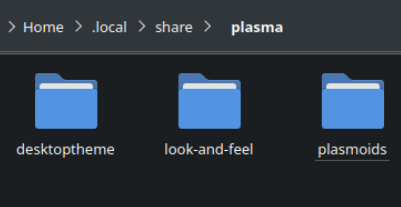
Manually Installing Themes
Step-by-step instructions to install custom themes on KDE Plasma.
- Download the theme manually from the KDE Store.
- Extracting the contents to
~/.local/share/plasma/(You may need to make this directory.) - Open the system settings and select your theme, style, cursor etc. as it now should appear.
Theme Extraction Locations
The location where specific KDE Plasma components will be extracted on the desktop.
Global Themes
Global themes are placed in ~/.local/share/plasma/look-and-feel/. (You may need to make this directory.)
Plasma Themes
"Plasma themes" are placed in ~/.local/share/plasma/desktoptheme/. (You may need to make this directory.)
Plasma Window Decorations
"Window decoration themes" are placed in ~/.local/share/aurorae/themes/. (You may need to make this directory.)
Icon / Cursor Themes
"Icon/Cursor themes" are placed in ~/.local/share/icons. (You may need to make this directory.)
Sounds
System sounds can be replaced in ~/.local/share/sounds. (You may need to make this directory.)
SDDM (Login Manager) Themes
SDDM themes can be layered at your own risk if they are available as RPM packages using rpm-ostree.
Application Permissions to Use Themes
Some Flatpaks need filesystem permissions for applications that have issues with cursor themes.
Example: (~/.local/share/icons/:ro in "Filesystem" in each problematic application or globally in Flatseal).
Customizing Other Desktops and Sessions
The default desktop environment for Bazzite is KDE Plasma which also happens to offer the most in-depth customization for a modern Linux desktop environment to date which is why this guide focuses heavily on Bazzite images that run KDE Plasma.
Manage GNOME Extensions (-gnome Images)
The "Extension Manager" application allows for installing new extensions to GNOME and managing currently pre-installed extensions. Proceed with caution as extensions can make your system unstable and if your desktop crashes then GNOME will disable all of the extensions on the next boot.
Steam Gaming Mode Customization (-deck Images)
Warning
Decky Loader will sometimes have issues with new Steam and Gamescope updates, and may need to be uninstalled temporarily.
Install Decky Loader then install CSS Loader to customize how Steam Gaming Mode looks. Be aware that third-party plugins may cause issues. Read Bazzite's Steam Gaming Mode quirks documentation to resolve common issues if you run into them after using Decky Loader.