Setting up Sunshine on Bazzite
What is Happening to Sunshine on Bazzite?
The Sunshine package is historically shipped and updated with the image. For a long time, Sunshine did not provide a stable package for Fedora 43 and 44, and this forced Bazzite to use the Sunshine-Beta package instead, causing users to have non-functional streaming after an update numerous times, due to multiple changes to their systemd service name.
Removing Sunshine from the base image allows Sunshine's versions to stay independent of Bazzite updates, avoiding the aforementioned situation.
The recommended way of setting up Sunshine on Bazzite is through Bazzite Portal, which now helps you set up the stable Sunshine flatpak package.
As of 16th May 2026, Sunshine has finally provided an F43 and F44 package. However the removal of Sunshine from the base Bazzite image has already occured along with the update to Fedora 44 on 29th April 2026.
What Should I Do If I am Currently Using Sunshine?
Users of Bazzite-Deck images, please read this Section
The guide below will walk you through switching to the Sunshine flatpak.
It is highly recommended that you do this with physical access to your machine, or at least with an ssh connection set up.
- Open the Bazzite Portal and select Sunshine
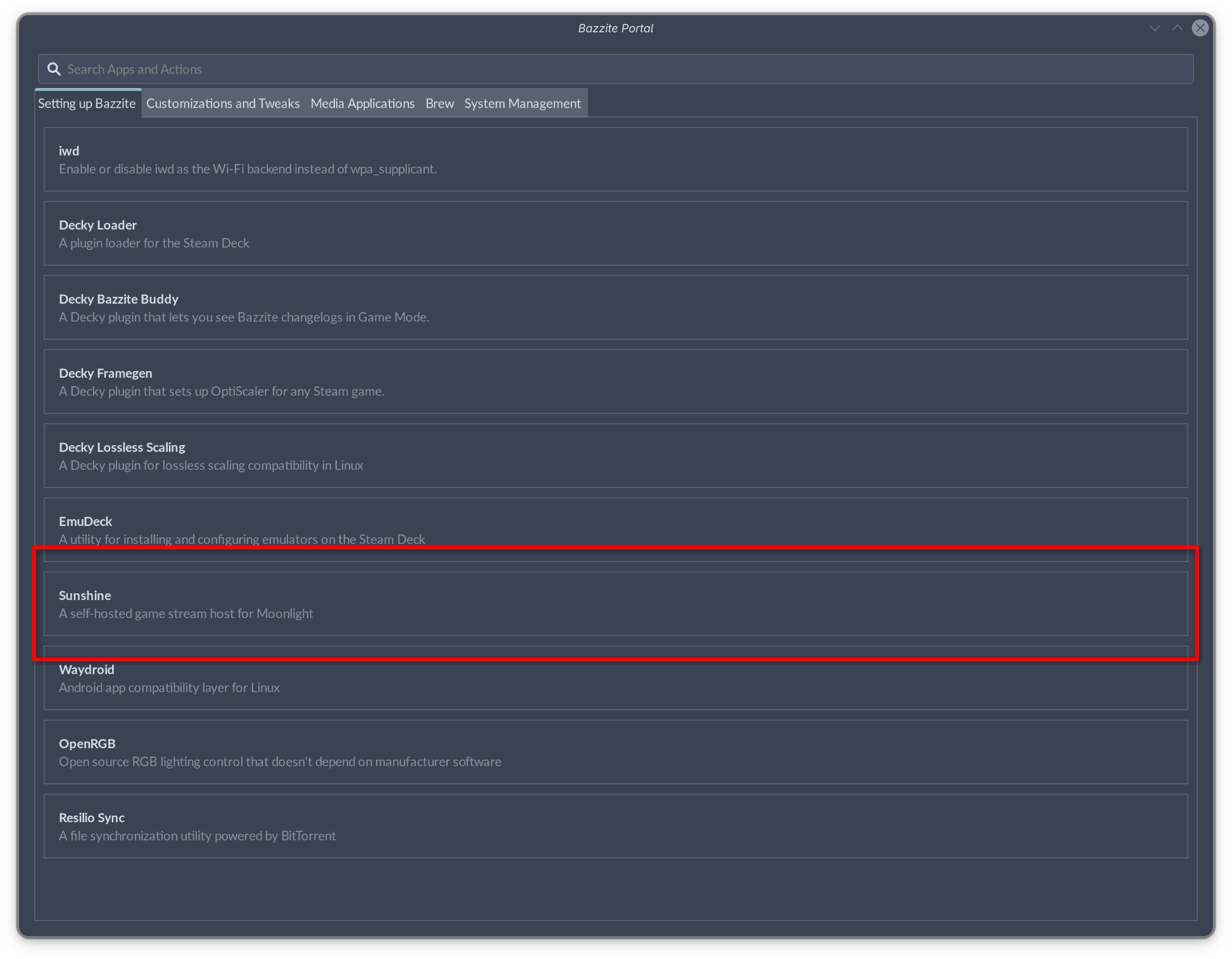
- Select Enable
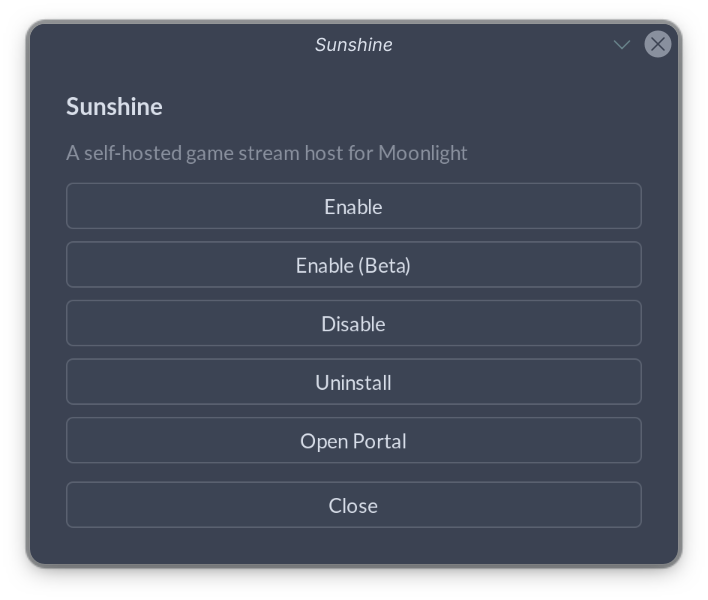
- A Terminal Window will appear. Wait for the installation to complete and you will be prompted to input your password to give extra permissions to Sunshine for screen capture and other functionalities.
- This is a good time to test if your new setup works - Your settings should persist.
Limitations of Installation through Bazzite Portal
The Bazzite Portal only helps you install and set up the stable Sunshine flatpak package. If you want to try a beta package for fixes to your system or due to other purposes, you will need to install it manually.
Bazzite Portal retains the ability to install the experimental beta Sunshine brew package for use in deck images. However, it is known to have issues related to screen capture and Systray indicator.
Alternative Sunshine Installations
Sunshine does provide an RPM (COPR) repository for their Fedora package. You may try to install Sunshine with alternative ways as listed below, albeit with some limitations.
Installation of Sunshine via these methods is not officially supported. Please report issues with Sunshine to the main Sunshine repository, report issues with packaging to their respective packaging repositories.
This is similar to the situation when Sunshine is/was included in the image.
Layering the Sunshine package from the official stable COPR by running
sudo dnf5 copr enable lizardbyte/stable
rpm-ostree install Sunshine
Note that Sunshine does not maintain a stable version across major Fedora updates. It's likely that a new package for the next major update of Bazzite will be missing! This will stop system updates from occurring until Sunshine provides an updated package. You will be asked to run rpm-ostree reset to remove all layered packages when this situation arises.
This is similar to the situation when Sunshine is/was included in the image.
In contrast with the official Sunshine COPR, this repository will be maintained explicitly for Fedora and it will have an updated package for every major release of Sunshine and Bazzite. Breaking changes will be handled by the package and it is tested on Fedora and Bazzite to ensure a smooth upgrade.
Layering the Sunshine package from the community maintained COPR by running
sudo dnf5 copr enable pvermeer/sunshine
rpm-ostree install sunshine
This community package is maintained by pvermeer, and is not officially endorsed, maintained, nor packaged by Bazzite.
Installing Sunshine Beta
Sunshine does not provide a repository for their flatpak package. You may try to install Sunshine Beta with alternative ways as listed below, albeit with some limitations.
Installation of Sunshine via these methods is not officially supported. Please report issues with Sunshine Beta to the main Sunshine repository, and issues with packaging to their respective packaging repositories.
Sunshine does not provide a Beta repository for their flatpak, nor host them on the flathub-beta repository, so you will need to download the flatpak manually from their GitHub Releases Page
1. Click Read more at the bottom of your desired release.
2. Find and download sunshine_x86_64.flatpak (or aarch64 for arm devices). Your downloaded file should be saved to ~/Downloads/
3. Run the following commands:
flatpak install --system ~/Downloads/sunshine_x86_64.flatpak
flatpak run --command=additional-install.sh dev.lizardbyte.app.Sunshine
systemctl --user enable --now app-dev.lizardbyte.app.Sunshine
You will have to manually update the package by repeating the steps above for each version.
This is similar to the situation when sunshine is/was included in the image.
Layering the Sunshine Beta package from the official Beta COPR by running
sudo dnf5 copr enable lizardbyte/beta
rpm-ostree install Sunshine
Note that this will stop system updates from occurring if Sunshine does not provide an updated package for future Fedora version updates (e.g. Fedora 45). You will be asked to run rpm-ostree reset to remove all layered packages when this situation arises.
Layering the Sunshine/Sunshine-Beta community maintained package by running
sudo dnf5 copr enable pvermeer/sunshine
rpm-ostree install sunshine-beta
This community package is maintained by pvermeer, and is not officially endorsed, maintained, nor packaged by Bazzite.
This method is primarily for users on the Deck images.
Select Yes in Bazzite Portal 🡒 App Install 🡒 Sunshine 🡒 Enable Beta (Brew).
This package is experimental and has known issues related to screen capture and systray indicator. Systray will be disabled and capture mode will be set to KMS by default when installed via Bazzite Portal.
Setting up Sunshine on Deck Images
Deck Images make use of Valve's gamescope microcompositor while in Game Mode. As gamescope does not support XDG Portal capture or Kwin Screencast, streaming must be done using KMS Capture. As the flatpak package of Sunshine does not support Capture via Kernel Mode Setting, you will need to install Sunshine via alternate means if you want to stream from Game Mode. You can stream using XDG Portal capture if you use Desktop Mode.
Select Yes in Bazzite Portal 🡒 App Install 🡒 Sunshine 🡒 Enable Beta (Brew).
This package is experimental and has known issues related to screen capture and systray indicator. Systray will be disabled and capture mode will be set to KMS by default when installed via Bazzite Portal.
This is similar to the situation when sunshine is/was included in the image.
Layering the Sunshine package from the official stable COPR by running
sudo dnf5 copr enable lizardbyte/stable
rpm-ostree install Sunshine
Note that this will stop system updates from occurring if Sunshine does not provide an updated package for future Fedora version updates (e.g. Fedora 45). You will be asked to run rpm-ostree reset to remove all layered packages when this situation arises.
Layering the Sunshine/Sunshine-Beta community maintained package by running
sudo dnf5 copr enable pvermeer/sunshine
rpm-ostree install sunshine
This community package is maintained by pvermeer, and is not officially endorsed, maintained, nor packaged by Bazzite.
Comparison of Ways to Install Sunshine on Bazzite
| Method | Flatpak (Bazzite Portal) | Brew (Bazzite Portal) | Layer from Official COPR | Layer from Community COPR |
|---|---|---|---|---|
| Doesn't block system updates | ✅ User space Installation | ✅ User space Installation | ❌ May block updates if COPR is not updated | ℹ️ Is actively maintained by pvermeer |
| Independent version from image | ✅ Manual pinning possible | ✅ Pinned version by default | ❌ Manual pinning not possible via rpm-ostree1 | ❌ Manual pinning not possible via rpm-ostree1 |
| Kernel Mode Setting Capture | ❌ SetCap not supported by Flatpak | ℹ️ May have issues on Nvidia | ✅ No known issues | ✅ No known issues |
| Stable Version | ✅ Stable is used by default | ℹ️ Requires manual installation | ❌ Inconsistent builds for Fedora releases2 | ✅ Auto updates, Community-Tested |
| Beta Version | ℹ️ Requires manual installation and updates | ✅ Beta is used by default, pinned by default | ℹ️ Auto updates, may have breaking changes | ✅ Auto updates, Community-Tested |
| Stability & Support | ✅ Offically Supported | ℹ️ Experimental, known issues with systray | ❌ Inconsistent builds for Fedora releases2 | ✅ Auto updates, Community-Tested |
Ultimately, it was decided to use Flatpak for desktop and Brew(beta) for deck images in the Bazzite Portal's Sunshine installation helper.
Streaming Using a Virtual Display
Something Went Wrong, What Should I do?
Is a display connected and turned on? (error 503)
This usually means that the Sunshine executable has trouble capturing the screen.
On some KDE Plasma/Sunshine versions, the permission of KWin ScreenCast is not set up properly with the zkde_screencast_unstable_v1 protocol. It can temporarily be fixed by setting the KWIN_WAYLAND_NO_PERMISSION_CHECKS=1 environment variable, which can be done automatically in Bazzite Portal → Install Applications → Setup Virtual Monitor → Fix Error 503, or by setting it in any of the following 3 places:
- System Wide Configuration:
/etc/environment.d/ - User Configuration:
~/.config/environment.d/(Bazzite Portal sets it here) - KDE Plasma Specific Configuration:
~/.config/plasma-workspace/env/kwin_vars.sh
You may also try explicitly allowing the Remote control option under KDE Settings 🡒 Application Permissions 🡒 Sunshine.
Kernel Mode Setting capture does not work on the Flatpak version of Sunshine due to Flatpak's sandboxing.
On installations via Brew, this generally means that the Sunshine executable is not given permission to capture the screen with Kernel Mode Setting. You can fix it by updating Sunshine through Bazzite Portal or manually running the post install script in /usr/libexec/sunshine-postinst.
Try to remove and set permissions for screen capture again. An XDG Desktop Portal window should pop up once asking for permissions for remote desktop.
Capturing with X11 is not supported. Screen capture is now handled via the compositor of your Desktop Environment (Kwin or Mutter) or via Kernel Mode Setting.
- X11 is not supported by Bazzite.
- NvFBC is an X11-specific option, and is thus also not supported by Bazzite.
- wlroots uses a specific protocol for wlroots-based compositors, which are usually tiling window managers. Bazzite does not have images with these compositors, so this option should only be needed in custom images with said compositors.
Error: Couldn't import RGB Image: 00003009 (error -1)
When checking systemctl --user status homebrew.sunshine*, the error Error: Couldn't import RGB Image: 00003009 is observed, and you are using an Nvidia system.
This is speculated to be some issues related to way Sunshine/CUDA is packaged on homebrew. Possible solutions include:
- Update Bazzite and reinstall Sunshine as a Flatpak through Bazzite Portal
- Using XDG Portal Capture and trying different encoders.
- Manually specify the GPU to use for capture if available.
- Installing the Beta version of Sunshine with alternative means.
Help Sunshine fix this if you do find a solution by reporting it upstream!
The `brew link` step did not complete successfully
This is a known issue with homebrew on systems with a symlinked home directory.
Consider trying the new stable or beta Sunshine flatpak by updating Bazzite and reinstalling Sunshine through the Bazzite portal.
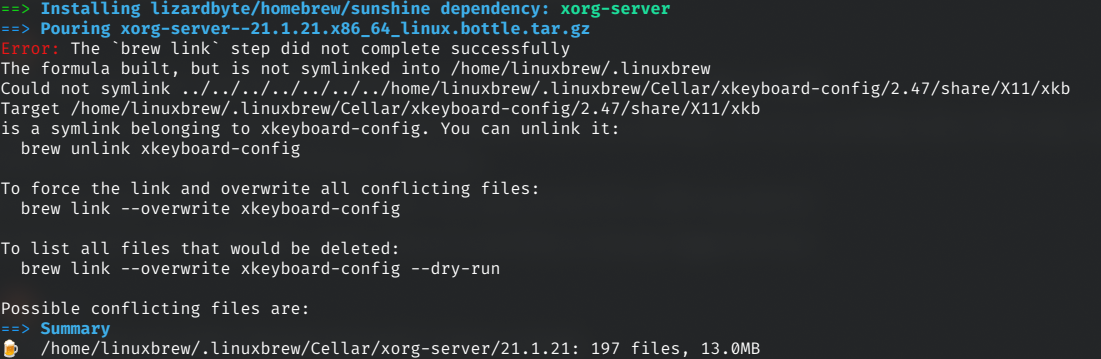
To fix this, manually make the directory for the Target that brew is complaining about, or run the following command:
mkdir -p /home/linuxbrew/.linuxbrew/Cellar/xkeyboard-config/2.47/share/xkeyboard-config-2
Running the unlink and linking commands may also fix it:
brew unlink xkeyboard-config; brew link --overwrite xkeyboard-config
Should you encounter any other issue, feel free to reach out on the Bazzite Discord!
-
Technically, you can grab and manually layer the builds generated from the COPR, but that requires you to uninstall and reinstall. ↩↩
-
Sunshine had inconsistent builds for their stable package (as in not providing packages for new fedora releases). See this section. ↩↩